Few moments test a technology leader like a production cutover. Customers keep transacting, the board expects a clean story, and the team is awake at 3 a.m. watching dashboards. The good news: a well-run cloud migration does not need a maintenance window. It needs rehearsal, parallel environments and a rollback you have already tested.
This guide gives CTOs a practical plan. You will learn how to choose a cloud migration strategy per workload, how to run an on-premises move in seven steps, which cutover patterns avoid outages, and when cloud migration services are worth buying. At the end, a short scorecard shows how ready your team is today.
What zero-downtime cloud migration really requires
Zero downtime is not luck. It comes from four habits that apply to every workload, large or small.
- Run in parallel. The old and new environments serve the same data until you are sure the new one is healthy.
- Move in small steps. Shift a slice of traffic, observe, then shift more.
- Replicate data continuously. The database is usually the hard part, so start syncing it early.
- Rehearse the rollback. A plan to go back is only real if you have gone back at least once in a test.
“Hope is not a strategy.”Traditional site reliability engineering saying, quoted in Google’s Site Reliability Engineering book (2016)
Teams that treat the cutover as a rehearsed routine, not a heroic event, are the ones that sleep through it.
Cloud migration strategy: choose the right path for each workload
There is no single cloud migration strategy for a whole estate. Mature teams pick one path per workload, and the common cloud migration strategies fall into six options, often called the 6 Rs.
| Option | What it means | Downtime risk |
|---|---|---|
| Rehost | Lift and shift servers as they are | Low, if data sync is planned |
| Replatform | Small changes, such as a managed database | Low to medium |
| Refactor | Redesign for cloud-native services | Medium, needs phased rollout |
| Repurchase | Replace with a SaaS product | Medium, data migration is key |
| Retire | Switch off what nobody uses | None |
| Retain | Keep on premises for now | None |
Start by retiring what you do not need. Every workload you retire is one you never have to migrate, secure or pay for. Then match the rest to business value and risk. A stable internal tool is a fine rehost candidate. A customer-facing platform may justify refactoring in stages.
On premises to cloud migration: a seven-step plan
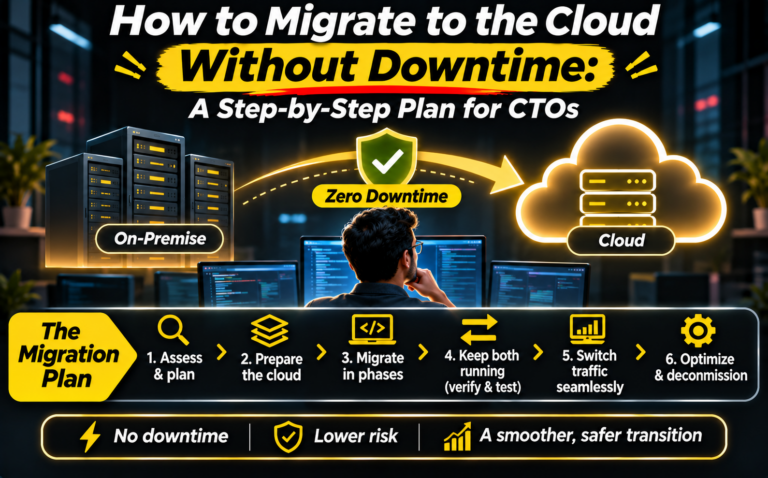
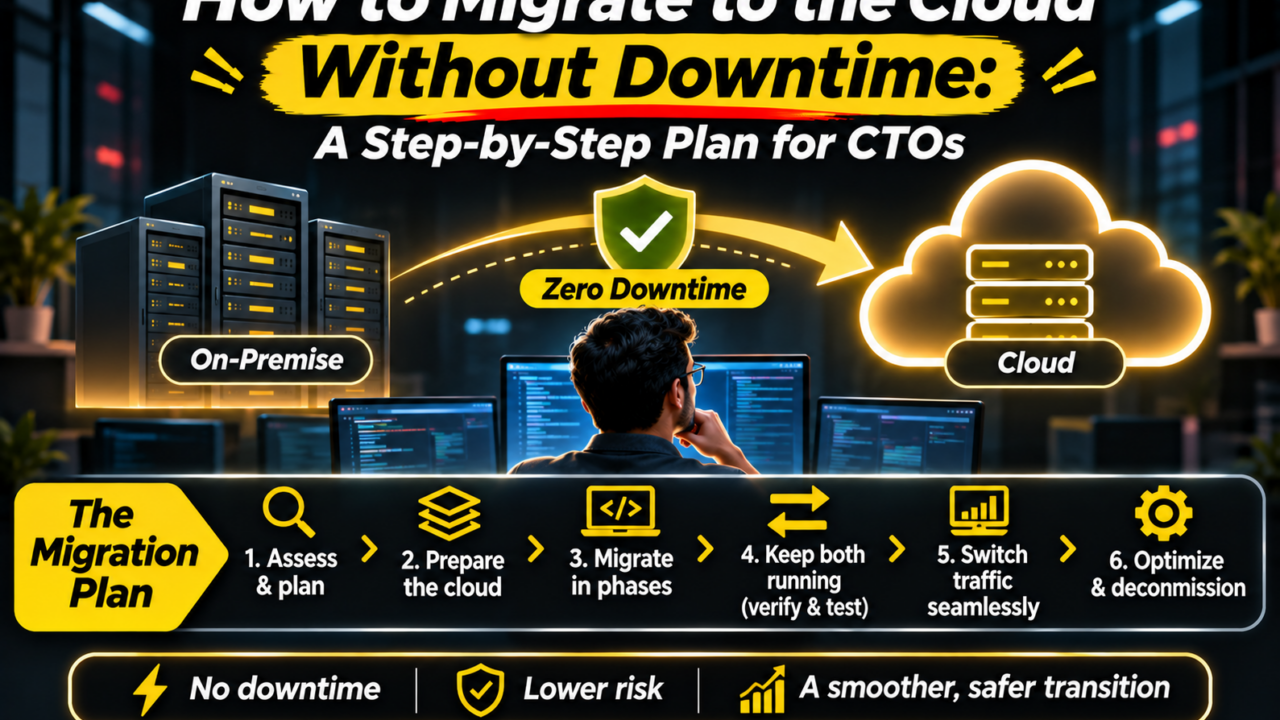
An on premises to cloud migration works best as a repeatable pipeline. Follow these steps in order and reuse them for each wave of workloads.
- Assess and inventory. List applications, data stores, owners and compliance needs. You cannot move what you cannot see.
- Map dependencies. Trace which services talk to which. Hidden dependencies cause most surprise outages.
- Build the landing zone. Set up accounts, networking, identity, logging and guardrails before any workload arrives.
- Replicate data early. Start continuous replication and measure the lag. Keep it running until cutover.
- Pilot one workload. Choose something low-risk with few dependencies. Prove the process and measure real pace.
- Cut over with a rollback. Shift traffic gradually, watch your key signals, and keep the old path ready for a set period.
- Optimize and decommission. Right-size resources, add cost alerts, then retire the old environment once you are confident.
This sequence is also your cloud migration plan in miniature. Turn each step into owners, dates and exit criteria, and review them after every wave.
Cutover patterns that avoid outages
Blue-green deployment
Keep two identical environments. The current one serves users while the new one is tested. When ready, switch traffic and keep the old environment on standby for instant rollback.
Canary release
Send a small share of real traffic to the new environment first. If error rates and latency hold, increase the share step by step.
Strangler pattern for large applications
Instead of moving a big system at once, route one capability at a time to new services. Martin Fowler described this approach, which he called the strangler fig application, as a way to replace a legacy system gradually without a risky big-bang switch.
Lower DNS lifetimes and sync the database first
Reduce DNS time-to-live values a few days ahead so traffic can move quickly. For the database, use change data capture or native replication so the target stays current, and agree a short, tested switch of the write path.
Cloud migration services: do it yourself, partner or hybrid?
Many teams ask whether cloud migration services are worth the cost. The honest answer is that it depends on your experience, timeline and risk tolerance.
Do it yourself
Works when you already have cloud engineers, a small estate and time to learn. The risk is slower pace and avoidable mistakes on the first wave.
Hire a partner
Cloud migration services can add speed, tooling and a tested playbook, especially for large estates or strict compliance. Some providers package this as cloud migration as a service, where a team runs the migration waves under an agreed scope. Ask for named engineers, sample runbooks and clear exit terms, and keep your accounts and code under your control.
Hybrid model
A common middle path: a partner designs the landing zone and leads the pilot, then your team runs later waves with coaching. You gain speed early and keep knowledge in house.
A realistic timeline and how to measure success
Be wary of any plan that promises a date before the pilot is done. A sensible rhythm looks like this: a few weeks for assessment and the landing zone, a pilot to measure your real pace, then waves of workloads sized by what the pilot taught you. Share the dates as ranges and update them after every wave.
Signals to watch during and after cutover
Choose a short list of measures before the first move and keep them on one dashboard. Useful ones include error rate, response time, data replication lag, successful deployments, and cost per workload compared with the old environment. Agree thresholds in advance, such as the error rate that triggers a rollback, so nobody debates it at midnight.
Hold a review after every wave
Spend an hour asking what surprised you, which dependency was missed, and what the runbook should say next time. Each wave should be calmer than the last. If it is not, pause and fix the process before moving more workloads.
Keep the business informed
Tell support, sales and customer success when each move happens and what to expect. A short note with the schedule, the contact for issues and the rollback plan builds trust and turns surprises into routine updates.
Security and cost guardrails to set before you start
Set identity, encryption and logging standards in the landing zone, so every migrated workload inherits them. Add budget alerts and tagging from day one, because cloud costs drift quietly. Agree who approves new resources and how long you will pay for the old environment after cutover. These small decisions prevent the two surprises CTOs dislike most: a security gap and an unexpected invoice.
Interactive: how ready are you for a no-downtime move?
Answer six quick questions. Your score and first fixes appear instantly. Nothing is stored or sent.
1. Do you have a current inventory of applications, data stores and owners?YesPartlyNo
2. Have you mapped which services depend on each other?YesPartlyNo
3. Are identity, networking, logging and cost guardrails ready in the target cloud?YesPartlyNo
4. Can you replicate data continuously and measure the lag?YesPartlyNo
5. Have you tested a rollback in a rehearsal, not just written it down?YesPartlyNo
6. Have you migrated one low-risk workload end to end?YesPartlyNoShow my scoreReset
Common mistakes that cause downtime
- Migrating before mapping dependencies.
- Starting database replication too late.
- Skipping the pilot because the schedule is tight.
- Cutting over without a tested rollback.
- Treating the move as an infrastructure task only, and leaving application owners out of the plan.
Frequently asked questions
Are cloud migration services worth it?
They pay off when you lack cloud experience, face a tight deadline or run a large estate. A hybrid model often gives the best balance of speed and learning.
What is cloud migration?
It is the process of moving applications, data and infrastructure from on-premises systems, or from another cloud, into a cloud environment.
Is zero downtime really possible?
For most workloads, yes. Run old and new environments in parallel, replicate data continuously, and switch traffic gradually with a tested rollback.
How long does a migration take?
It depends on the number of workloads and their dependencies. Start with a pilot workload to measure your real pace before committing to dates.
Which workload should move first?
Pick a low-risk, well-understood workload with few dependencies so the team can prove the process before touching critical systems.
Want a second opinion on your migration plan?
Book a 20-minute call with iAastha. We will review your workloads, strategy, cutover approach and the cloud migration services you may need. Detailed client proof is shared after an NDA. Start at iaastha.com.